




How Many Ethernet Ports Does a Proxmox Mini PC Need?
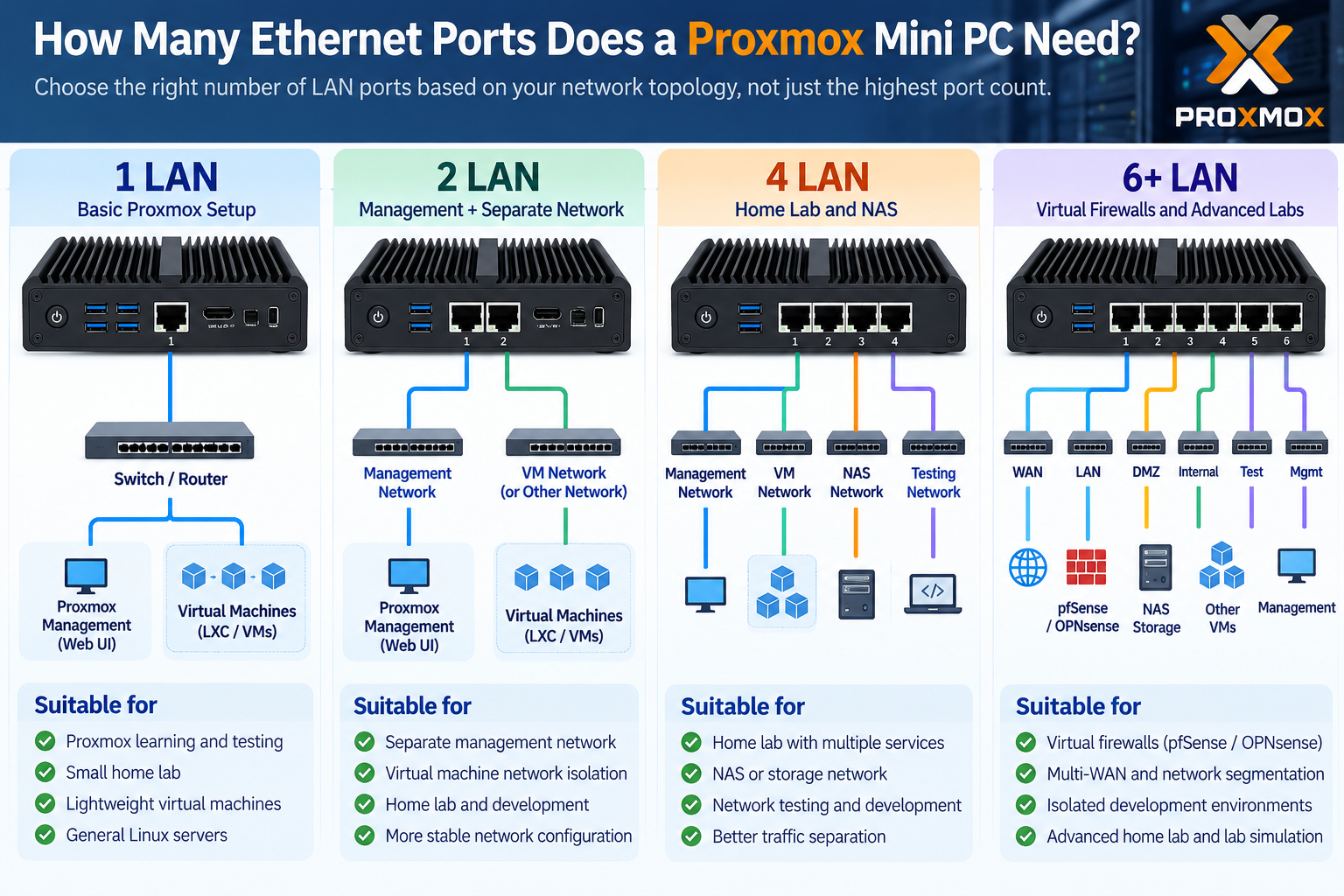
A Proxmox mini PC can run virtual machines, Linux containers, and network services using just one Ethernet port. However, multiple physical LAN ports can make network isolation, traffic management, and troubleshooting much easier.
So, should you choose a dual-LAN mini PC, a 4-port model, or a system with six or more Ethernet ports? The answer depends on your home lab setup and virtualization workload.
1. Is One Ethernet Port Enough for Proxmox?
Yes. Proxmox VE can use a single physical Ethernet interface for host management and multiple virtual machines.
A Linux bridge, such as vmbr0, allows virtual machines to share the same network connection. VLANs can also separate different networks when supported by the switch and network configuration.
This is sufficient for basic Proxmox learning, lightweight Linux servers, and small home labs.
However, management and virtual machine traffic share the same physical connection. Incorrect network configuration may also interrupt access to the Proxmox management interface.
2. When Should You Choose 2, 4, or 6+ LAN Ports?
Multiple Ethernet ports provide greater flexibility when building a virtualization server.
| LAN Ports | Recommended Applications |
|---|---|
| 1 LAN | Basic Proxmox learning and lightweight VMs |
| 2 LAN | Separate management and guest networks |
| 4 LAN | Home labs, NAS connectivity, network testing |
| 6+ LAN | Virtual firewalls, multi-WAN, network segmentation |
For example, a 4-port Proxmox mini PC can dedicate separate interfaces to management, virtual machines, storage, and testing.
Six or more ports become useful when running pfSense or OPNsense as virtual firewalls, especially when physical network separation is required.
However, more Ethernet ports do not automatically increase virtual machine performance. CPU resources, RAM, storage speed, and network bandwidth remain important.
3. Recommended Qotom Mini PCs for Proxmox
Qotom offers multi-LAN mini PCs suitable for different virtualization and networking requirements.
Q10900G4-S04 — 4 × 2.5GbE for Home Labs
The Q10900G4-S04 features Intel Alder Lake-N or Twin Lake-N processor options, four Realtek 2.5GbE ports, and DDR5 memory support up to 48GB.
Its compact, fanless design makes it a practical option for Proxmox home labs, Linux virtual machines, and lightweight containers.
Best for: General virtualization, small home labs, and users who need several physical network connections without excessive complexity.
Q10900G6-S08 — 6 × 2.5GbE for Virtual Firewalls
The Q10900G6-S08 provides six Intel I226-V 2.5GbE ports, Intel Alder Lake-N or Twin Lake-N processor options, and DDR5 memory support.
Its additional physical interfaces are useful for separating WAN, LAN, management, and testing networks.
Best for: Proxmox environments running virtualized pfSense or OPNsense, network segmentation, and advanced home lab experiments.
Q31100GT-S23 — 10 * 2.5GbE For Advanced Network Labs
For more demanding network environments, the Q31100GT-S23 combines Intel 11th Gen Tiger Lake processors with ten Intel I226-V 2.5GbE ports.
It also supports dual DDR4 memory up to 64GB and uses active cooling.
Best for: Advanced Proxmox labs, multiple isolated networks, virtual firewalls, and network testing environments requiring extensive physical connectivity.
4. What Else Matters Besides LAN Port Count?
Before choosing a Proxmox mini PC, consider these hardware requirements:
CPU: Ensure sufficient processing capacity and hardware virtualization support.
RAM: Choose memory capacity based on the number and size of virtual machines.
Storage: NVMe SSDs can improve virtual machine responsiveness.
Network controllers: Verify Linux driver compatibility with your intended Proxmox version.
PCIe passthrough: Check IOMMU support and device grouping if direct NIC assignment is required.
A multi-LAN mini PC can provide excellent networking flexibility, but balanced hardware specifications are essential for reliable virtualization.
Final Thoughts
For basic Proxmox learning, one Ethernet port is enough. For most home labs, four LAN ports provide a useful balance between flexibility and simplicity.
The Qotom Q10900G4-S04 is a practical starting point for general virtualization. Users building virtual firewalls or more complex network environments can consider the six-port Q10900G6-S08 or ten-port Q31100GT-S23.
Ultimately, choose the number of Ethernet ports based on your network topology and actual workload—not simply the highest available port count.